


NovelFun - Webnovel & Fictions
2.78.00 Reviews
App Specs
- Version
- 1.3.11
- Updated On
- License
- Free
- Downloads
- 10,000+
- Developer
- Beet Mobilidade
- Categories
- Books & Reference
- Platform
- Android
Screenshots
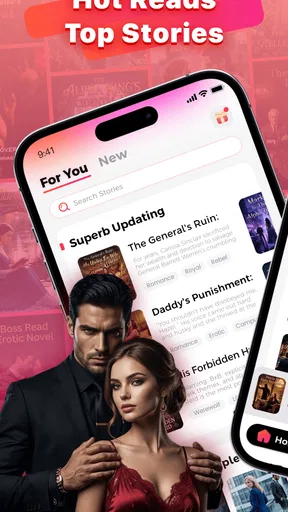
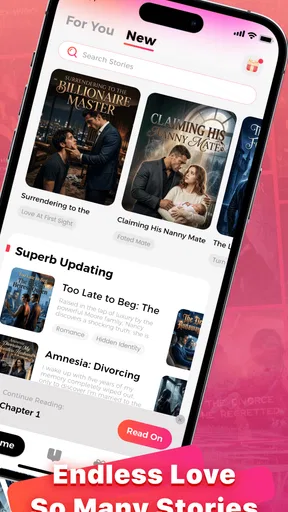
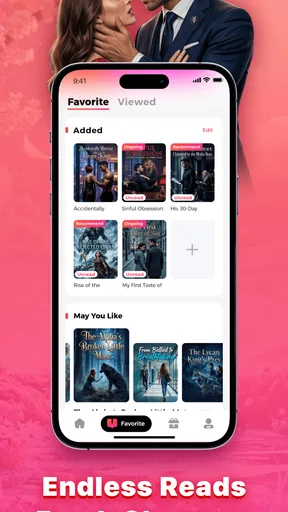
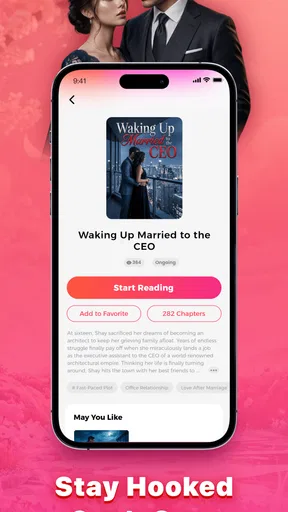
 Analysis by AppCompare
I opened NovelFun - Webnovel & Fictions expecting a straightforward reading app, and that is the right way to approach it. It belongs to Books & Reference rather than being a general social network or a writing tool, so its main appeal is the simple act of finding a story and settling into it. The developer is Beet Mobilidade, and the app is free to install, although optional purchases range from $0.49 to $99.99 per item. That combination makes the first step easy, but it also means I would pay attention to how far I get before deciding whether the reading experience suits me.
The app is aimed at readers who like web fiction and want something more immediate than choosing a printed book or searching across several unrelated websites. Its Teen content rating gives a useful signal about the intended audience, even though individual stories can still feel very different in tone. I would not treat the catalog as a replacement for a carefully edited bookstore selection. I see it more as a place to browse, sample, and follow serialized fiction when I want a quick story on my phone.
From a spare moment to a reading routine
I start this section with the small, practical moments when a reading app can earn a place in my day: a quiet wait, a lunch break, or a few minutes before bed. I’ll focus on how to turn casual browsing into a routine without letting an unfinished story or a purchase prompt set the pace. The next section looks at what changes once a title becomes part of regular reading.
Starting with the right expectation
My first recommendation is to begin with a specific reading mood instead of opening the app and scrolling without a plan. If I have ten minutes during a commute, I might look for something easy to sample. If I want a longer evening session, I would spend more time judging the opening chapters, the writing style, and whether the story appears to be moving toward a plot I actually want to follow. That small change in approach matters because web fiction can be highly uneven: one story may catch me immediately while another may need more patience than I have that day.
The store summary presents the service as a place where stories come alive, but I found that the real value depends on the discovery stage. The app is not automatically useful just because it contains fiction. I need to make a quick decision about whether a title deserves my attention, and that decision should be based on the sample itself rather than on a dramatic title or cover image. For readers who enjoy exploring unfamiliar authors, this can be part of the fun. For readers who want a polished, predictable recommendation every time, it may feel less efficient than a curated ebook service.
Finding a story without wasting the reading window
A practical workflow is to use the first few minutes for selection, not commitment. I would open a promising title, read enough to check the voice, look for signs of rushed editing, and ask whether the central situation is clear. If the opening relies on confusion without giving me a reason to care, I would move on quickly. This is one of the most useful habits with an app like this: sampling several possibilities is often better than forcing myself through the first story that appears.
I also recommend separating “interesting premise” from “good fit for tonight.” A dramatic fantasy may sound appealing but demand more concentration than I have after work. A shorter, lighter serial may be the better choice for a short break. NovelFun works best when I treat the catalog as a flexible shelf rather than a single recommended queue. That approach gives the app a clear role in my routine: it supplies options, while I remain responsible for choosing the right one.
Worth Reading Before You Choose

EA SPORTS FC Mobile 26 Is a Bigger Football Game, but It Takes Time

Flipboard Shows What News Apps Must Do Beyond the Feed

Switching to Android Auto Means Rethinking Your Driving Routine

Google Calendar Makes a Crowded Week Easier to Manage

Ludo King Makes the Most of the Minutes Between Plans

Baby Panda World Brings Quick Play to Modern Phones, but Its Game Library Feels Busy
The reading handoff: from discovery to attention
The important handoff happens when browsing ends and reading begins. At that point, I stop judging the title as a product and start judging it as a story. I would keep the first session long enough to see whether the characters, setting, and pacing work together. A title that looks attractive in a list can lose its appeal once the prose begins, while a less eye-catching story can become surprisingly absorbing after a few pages.
This is also where phone reading creates a trade-off. A mobile screen is convenient, especially when I am waiting in line or traveling, but it is not as comfortable as an ebook reader for a long uninterrupted session. I would use the app for short and medium reading periods, then switch to a larger screen or a dedicated reading device if eye comfort becomes an issue. That does not make the app poor; it simply defines the situation in which it is most useful.
For a realistic everyday example, imagine that I have a lunch break and want to read instead of watching short videos. I can use the opening part of the break to browse, test a story, and continue only if the writing holds my attention. If the title turns out to be too slow, I have lost only a small amount of time. If it works, the app gives me an easy way to turn that spare moment into a regular reading habit. This low-commitment workflow is more convincing to me than the idea of downloading it solely because it has a large selection.
Managing the cost boundary
Because the app is free to install but includes optional purchases, I would establish a personal spending rule before becoming attached to a long serial. My rule would be simple: read enough to understand the rhythm of the story, then decide whether continuing is worth any purchase shown in the reading path. I would not buy simply because I had already invested time. That is the sunk-cost trap that can make serialized reading feel more expensive than expected.
The purchase range stretches from small amounts to much larger individual items, so the difference between casual sampling and committed reading is important. A reader who only wants free material should be cautious when a story reaches a locked continuation. Someone who is comfortable paying for ongoing fiction should still check each prompt carefully and consider whether the story has earned that commitment. The app’s free entry point is convenient, but “free to start” is not the same as “every chapter is free.”
What happens after a story earns my attention
Once I find a title I want to continue, the experience changes from discovery to continuity. I need to remember where I stopped, return without confusion, and keep the story separate from the many other titles I may have sampled. This is the point where a reading app either becomes part of my routine or turns into a temporary browsing tool. I would test that handoff early rather than waiting until I have several unfinished stories competing for attention.
My practical tip is to keep a very small active list. I would follow only the stories I genuinely plan to read and leave borderline titles alone. That reduces decision fatigue and makes the next session clearer. If I collect every interesting premise, the app can become another source of digital clutter. If I choose one or two strong candidates, the reading habit feels more deliberate and the value of the service becomes easier to judge.
Where the workflow becomes less comfortable
The main friction is not the act of opening a story; it is the uncertainty around long-term reading. Web fiction often depends on sustained interest, and a reader may need to invest time before knowing whether the narrative will remain satisfying. The optional purchase structure adds another layer of hesitation. I can enjoy the beginning and still decide not to continue if the cost of following the story no longer feels reasonable.
The modest public response also affects my confidence. NovelFun has an average rating of 2.9 from around nineteen ratings and seven written reviews, with over ten thousand installs. I would not use those figures as a final verdict, because a small review pool can reflect a narrow set of experiences, but I would take them as a reason to test the app personally before building a large paid library around it. The gap between trying it and committing to it is important here.
I would also skip this app if my priority were professionally edited books, dependable offline reading, or a carefully organized collection from established publishers. A conventional ebook store is usually a better match for that purpose. Likewise, readers who dislike cliffhangers, serialized pacing, or the possibility of paid continuation may become frustrated even if they enjoy the individual stories. NovelFun is better suited to curiosity-driven readers than to people who want a finished book with no interruptions.
Device fit and version context
The current version is 1.3.11, and the app supports devices running Android 7.0 or newer. That makes it accessible to many older Android phones, which is helpful for readers who do not own a recent device. I would still judge the experience on the phone I plan to use most, because reading comfort depends heavily on screen size, text rendering, and how easily I can return to the app after an interruption.
That older operating-system support is a practical advantage, but it should not be confused with a guarantee that every older phone will feel equally smooth. A device with limited storage or a small display may make browsing and extended reading less pleasant. My advice is to install it on the phone used for everyday reading, not merely on a spare device, and then test a complete start-to-stop session: open a title, read for a while, leave the app, and come back later. That reveals more than a quick launch test.
Comparing it with familiar alternatives
Compared with a library app, NovelFun is more discovery-oriented and less tied to borrowing rules. A library service is usually the better choice when I want access to finished books through an existing membership and do not want to think about chapter purchases. Compared with a traditional ebook marketplace, NovelFun feels more focused on web fiction and ongoing reading rather than one-time purchases of completed editions.
Compared with reading stories in a mobile browser, a dedicated app can feel more focused because the reading activity has its own place on the phone. The browser remains better when I want to move freely between many websites or avoid adding another app. The choice comes down to habit: I would choose NovelFun when I want a single fiction-focused destination, and a browser when I prefer maximum flexibility.
It also differs from writing platforms. If my goal is to publish my own work, exchange detailed feedback, or participate in a strong author community, I would look for a service built around creation and interaction. This app makes more sense when my role is primarily reader. That distinction prevents disappointment and helps explain why the experience may feel satisfying for a quiet reading session but limited for someone seeking a creative social space.
Three habits that make the app more useful
Sample before following: I would test the opening rather than saving every attractive title. This keeps the reading list manageable and exposes weak writing or unsuitable pacing early.
Separate free exploration from paid commitment: I would decide in advance how much I am willing to spend and avoid purchasing simply to justify time already invested.
Match story length to the moment: I would choose a lighter serial for short breaks and reserve more demanding fiction for a quiet session, instead of blaming the app when the timing is wrong.
These habits are more valuable than endlessly browsing. They turn the app from a stream of tempting covers into a controlled reading workflow. They also make it easier to answer the question that matters most: am I enjoying the story enough to keep returning, or am I only enjoying the search for one?
Who should install it
I would recommend giving NovelFun a try if you enjoy discovering webnovels, like reading in short bursts, and are comfortable judging stories for yourself. It is particularly suitable for someone who wants a free starting point and does not mind that the path from a free opening to continued reading may involve optional purchases. The Teen rating also makes it more appropriate for older young readers and adults than for children looking for a tightly controlled reading shelf.
I would be more cautious if you need a guaranteed premium editorial standard, dislike unfinished or ongoing narratives, or want every title to have a transparent one-time price. In those cases, a library service or conventional ebook store will probably produce less friction. The app is not a universal replacement for those options; its strength is the chance to discover serialized fiction quickly.
My result after following the full workflow
After treating it as a browse, sample, read, and then decide experience, I found a clear use case for the app. It can turn a few unused minutes into a story session without requiring a large initial commitment. The best outcome comes when I choose selectively, keep my active reading list small, and make a conscious decision before spending money on continuation.
My final view is cautiously positive rather than enthusiastic. The free entry point and Android compatibility make NovelFun easy to test, while its focus on web fiction gives curious readers something different from a standard ebook shelf. At the same time, the middling average rating, limited public review volume, and possible purchase friction mean I would not recommend committing blindly. Try it as a discovery tool first, then let the quality of the stories—not the promise of endless reading—decide whether it earns a permanent place on your phone.
Pros
- Large library of webnovels across romance
- fantasy
- and other popular genres.
- Personalized recommendations help readers discover stories matching their interests.
- Regular chapter updates keep ongoing novels fresh and encourage continued reading.
- Offline reading makes selected chapters accessible without a constant internet connection.
- Simple reading interface supports comfortable browsing on phones and tablets.
Cons
- Some stories may contain uneven editing
- grammar issues
- or inconsistent translations.
- Many novels require coins or in-app purchases to unlock later chapters.
- The quality and completion status of stories can vary considerably.
- Frequent notifications may feel distracting if update alerts are enabled.
- Availability of titles and features may differ by region or account.
FAQs for NovelFun - Webnovel & Fictions
What is NovelFun – Webnovel & Fictions?
NovelFun – Webnovel & Fictions is a reading app focused on serialized web novels, fiction stories, and genre-based entertainment. After opening the app, readers can browse available titles, explore categories, read chapters, and follow stories that match their interests. The selection, chapter availability, and reading experience may vary depending on the user’s region, app version, and the publishing schedule of each novel.
Is NovelFun free to download and use?
NovelFun can generally be downloaded at no initial cost, allowing users to install the app and explore its library before deciding whether to spend money. However, some stories or chapters may use a premium access system, such as coins, credits, subscriptions, advertisements, or other in-app purchases. Before unlocking content, users should carefully review the displayed prices, payment terms, and any available free reading options.
What types of stories can I read on NovelFun?
The app is designed for readers who enjoy web fiction and commonly features genres such as romance, fantasy, drama, mystery, adventure, supernatural fiction, and other serialized narratives. The exact catalog can change frequently as new books and chapters are added. Because content availability differs by language, location, and licensing arrangements, users should browse the categories or search function to confirm that their preferred genres are represented.
Does NovelFun require an account or an internet connection?
Some basic browsing and reading features may be available without immediately creating an account, but signing in can be necessary for saving reading progress, synchronizing a library, collecting rewards, commenting, or accessing purchases across devices. An internet connection is normally needed to load the catalog and retrieve new chapters. If the app offers offline reading, users should check whether downloads are limited to selected chapters or premium content.
Is NovelFun suitable for every age group?
NovelFun may contain stories intended for different audiences, and some novels can include mature themes, romance, violence, emotionally intense situations, or suggestive material. Parents and younger readers should review the app’s age rating, content labels, privacy settings, and individual story descriptions before use. Since fiction is supplied across multiple genres and authors, the suitability of one title should not be assumed for the entire library.


